CadQuery Agent
Local Text/Image to Editable 3D
Describe a part in words or a picture and get an editable 3D model.
Built with Python
 FastAPICadQuery
 Ollama
 Docker
 Three.js
 PodmanQwen2.5-Coder / Qwen2.5-VL
 pytest
Overview
Text-to-CAD tools usually hand you a mesh you cannot edit, and they often send your prompts and images to a hosted model. I wanted something different: a tool that writes real CadQuery Python, so every dimension stays editable, and runs entirely on my own machine with an open-weight model.
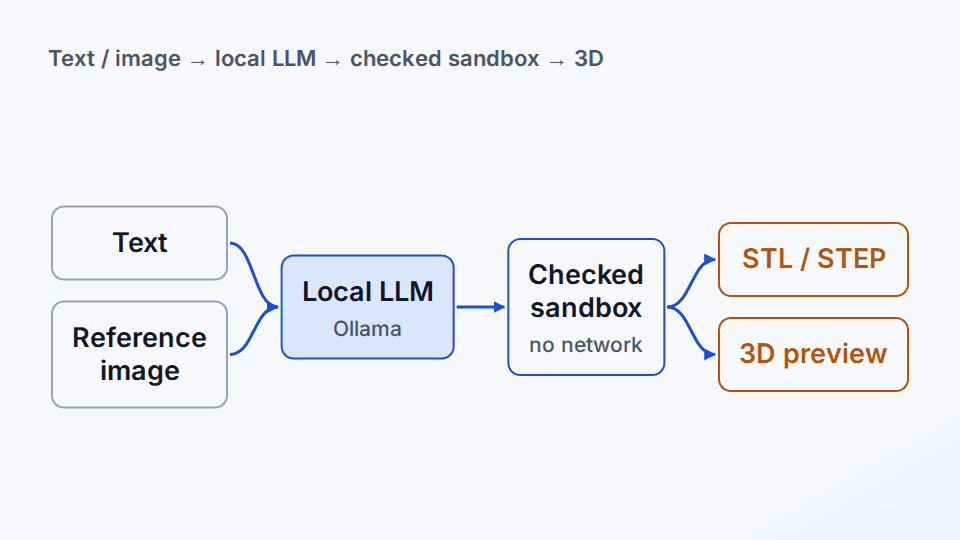
I built CadQuery Studio, a local harness that turns a text description, a reference image, or both into CadQuery source, an interactive 3D preview, and STL/STEP files. It only talks to a model server on loopback (Ollama or a local vLLM server); remote and hosted endpoint URLs are rejected.
The hard part is that the model writes code that then gets executed. Every script goes through static checks first and then runs inside a no-network, read-only, resource-limited container. Generated geometry still needs a human review before fabrication, but because the output is plain Python and STEP, a wrong dimension is a one-line fix rather than a full regeneration.
The question
Can a small local model generate useful, editable CAD programs while generated code remains isolated, reviewable, and safe to execute?
Key features
- Accepts a text prompt, a PNG/JPEG/WebP reference image plus text, or both, through a local OpenAI-compatible chat endpoint.
- Statically checks every generated script before execution, blocking non-CadQuery imports, file and network access, and dynamic code execution.
- Runs the code in a Docker or rootless Podman worker with no network, a read-only filesystem, dropped Linux capabilities, and CPU, memory, process, and time limits.
- Shows an interactive Three.js preview next to the full editable Python source, with STL and STEP downloads.
- Keeps each project as immutable revisions, so an object can be built prompt by prompt and any older revision can become the base of a new branch.
- Automatically asks the model to repair some CadQuery runtime failures, and a failed step never overwrites the last working revision.
How it works
Prompt the local model
The text and optional image go to an open-weight model (for example qwen2.5-coder or qwen2.5vl) served on localhost, with instructions to return only CadQuery Python that assigns its final object to result.
Static checks
The returned code is parsed with Python's ast module and rejected if it imports anything other than cadquery or numpy, calls eval/exec/open, or never builds a cq.Workplane. Errors are fed back to the model for up to three attempts.
Isolated render
A CadQuery/OpenCascade worker container executes the validated script with no network and strict resource limits, then exports the geometry.
Preview and revise
The browser shows the 3D model and its source; plain-language changes (Add part, Change, Remove part, Enhance) or direct code edits become new verified revisions.
Examples
Input
Model output: import os result = os.getcwd()
Output
Rejected before execution: "import is not allowed: os" and "code must construct geometry with cq.Workplane(...)". The errors are appended to the prompt and the model is asked for a corrected script.
Input
1. Create a 100 x 60 x 8 mm mounting plate. 2. Add four 6 mm holes, each 10 mm from the nearest corner. 3. Add a centered 24 mm diameter boss, 12 mm tall. 4. Cut an 8 mm through-hole through the boss and plate. 5. Add 3 mm fillets to the outside vertical edges.
Output
Five saved revisions, one per prompt, each with its own editable CadQuery source, 3D preview, and STL/STEP export. Selecting an earlier revision before the next prompt starts a new branch.
Tech stack
Agent, validation, and project logic
Local HTTP API and web studio backend
Editable parametric CAD code and exports
Serves open-weight models on loopback
Sandboxed, no-network CAD render worker
Interactive in-browser 3D preview
Rootless alternative for the worker
Recommended local text and vision models
Tests against a mocked local endpoint
What I learned
- Generated code needs explicit static checks and runtime isolation before execution
- Editable source and standard CAD exports make model errors correctable rather than opaque
Limitations
- Complex mechanical intent and dimensions inferred from images still require human review